
The MoSCoW Matrix: Prioritise to Deliver on Time
Updated on22 August 2025· Published on20 August 2025 | Betty Lamy | 8 min read

Delivering a digital project on time without sacrificing quality is often a headache. Too many features, a fixed budget, tight deadlines: most teams get exhausted trying to do everything at once. At Agerix, we’ve found a method that transforms this chaos into a clear strategy: the MoSCoW matrix . This simple and incredibly effective prioritization tool allows us to deliver complex business applications on time, even when the scope evolves along the way.
In concrete terms, MoSCoW requires us to distinguish between what is essential and what is secondary . This is what allowed Travel-Safe to launch its application despite three major changes and the arrival of COVID, EuropeanCancer to save its project two weeks before delivery, and Julie Pujols to generate revenue from the first day of her V1. By prioritizing what really matters, we avoid budgetary drifts and ensure a rapid return on investment.
In this article, I show you how we use MoSCoW on a daily basis: not academic theory, but the practical experience that has allowed us to deliver more than 150 projects without ever losing sight of the essentials.
Why Everything Can’t Be “Priority 1” (and How MoSCoW Fixes It)
Before I tell you how we use MoSCoW at Agerix, let me tell you what happens without it.
Last year, a prospect came to us after blowing 60% of their budget with another service provider. Their mistake? Validating a specification where each line began with “Critical” or “Essential.” As a result, the development team became scattered, started 15 projects in parallel, and after 6 months, nothing was truly functional. They had 30% of everything instead of 100% of the essentials.
This is exactly what MoSCoW prevents. Developed in 1994 by Dai Clegg at Oracle UK, this matrix forces a conversation that no one wants to have but everyone needs to have: “If we can’t do everything, what do we do first?”
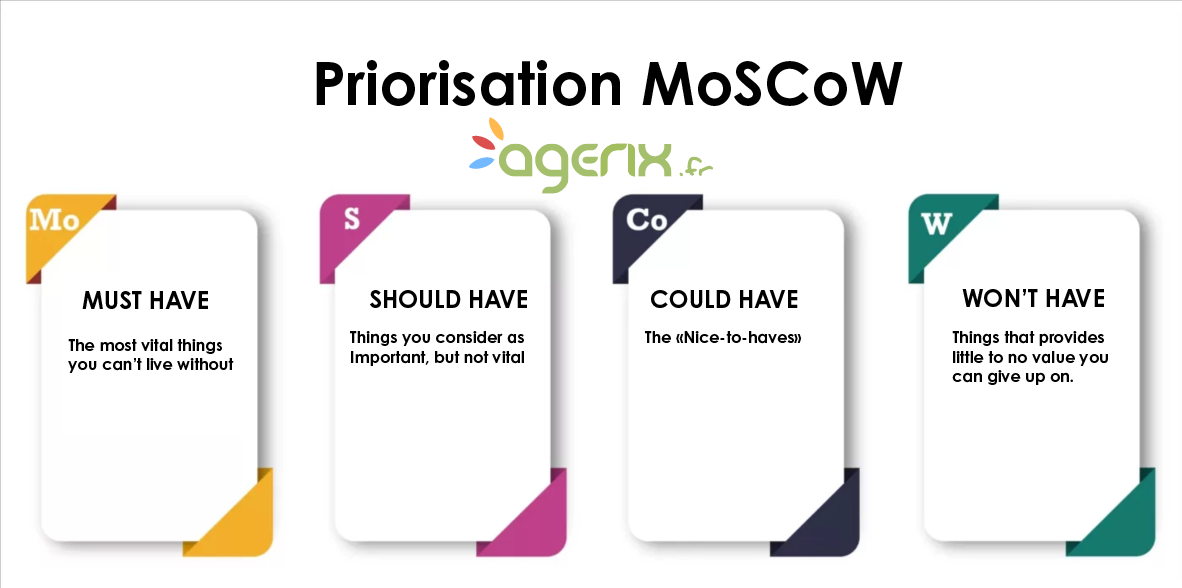
The four MoSCoW categories: field translation
Forget academic definitions. Here’s how I explain MoSCoW to my clients during our first scoping workshop :
M - Must Have (The Foundations of Your Home)
"Without that, we might as well not launch the project."
When we developed Julie Pujols’ system, the Must Haves were crystal clear:
- The subscription payment system (without it, no income)
- Protecting premium videos (its content is its business)
- The secure member area (its 15,000 subscribers must be able to log in)
My foolproof test: “If this feature isn’t there on D-day, do you postpone the launch?” If the answer is yes, it’s a must-have.
For the 13th arrondissement Academy , being able to register a student and assign them to a course was a must-have. The automatic certificate generation module? Certainly not—they could continue on Word for two more months.
S - Should Have (The walls and the roof)
"It's going to hurt if we don't get it, but we'll survive."
These are the features where your teams will grumble, perhaps work overtime to manually compensate, but the business continues to run.
Case in point: For European Cancer , the real-time data display was a must-have for the Brussels demo. But the custom PDF export module? A must-have. They could take screenshots for their reports for a few weeks, even if it wasn’t ideal.
C - Could Have (Decoration and garden)
"That would be really cool, but honestly..."
This is where I often bring up my favorite example: Travel-Safe absolutely wanted an AI chatbot to answer basic customer questions. Friendly, modern, sales-oriented… but their three salespeople managed the 20 daily email requests very well.
Could Haves are our wiggle room. When a Must Have turns out to be more complex than expected (and believe me, it happens often 😉), this is the category we use to save time .
W - Won’t Have (Not this time, sorry)
"We'll talk about it again in V2."
I always insist on filling out this category from the beginning. Why? Because it avoids awkward conversations three weeks before delivery . “Oh, but I thought we’d also have…” No. It was marked Won’t Have, so we validated it together.
For Julie Pujols, the native mobile app was a Won’t Have. She wanted it, we wanted it, but with the budget and deadline, it was her or the rest. Today, it’s part of V3, currently under development.
Manage your digital projects with MoSCoW: a prioritization method that secures deadlines, budget and strategic ROI.
How we apply MoSCoW on the ground (and why it works)
The launch workshop: 2 hours that save 6 months
When a client signs with Agerix, my first instinct isn’t to open a Gantt chart or talk technology. It’s to block off two hours in their schedule for what I call the “MoSCoW workshop.”
I remember the look on the face of the director of a large company for whom we were doing our first development when I told him: “We’re going to need you, the training manager, the accountant and two field users.” His reaction: “Betty, we don’t have time for meetings, we have to move forward!”
Those two hours saved us three months. Why? Because the accountant explained directly to the director that automatic invoice generation was more important than the real-time dashboard he absolutely wanted. Without that conversation, we would have discovered this critical need during the acceptance phase.
My 5-step process (the one proven on 50+ projects)
1. The Unfiltered List (30 minutes)
I ask everyone to get their minds off things. Post-its, whiteboards, whatever. For the 13th arrondissement Academy, we started with 82 “needs.” From the room reservation system to the automatic doorbell to sending text messages to parents. Everything is discussed, without judgment.
My tip: I note who asks what . It helps later.
2. The first brutal sorting (20 minutes)
This is where I come up with my favorite question: “The project is delivered tomorrow. You can only keep 10 features. Which ones?”
Guaranteed effect. Suddenly, the animated logo on the homepage becomes much less essential than managing teacher absences. 😎
3. The Reality Test (45 minutes)
For each item in their top 10, we apply the “cancellation test”:
- “Without this feature, you cancel the launch?” → Must Have
- “Without this feature, is anyone working overtime?” → Should Have
- “Without this feature, someone complains but life goes on?” → Could Have
European Cancer was adamant: without real-time data display, they would cancel the presentation in Brussels. Must-have approved. On the other hand, what about dark mode for the interface? The CTO laughingly admitted that it was more for the sake of modernity…
4. Budget negotiation (15 minutes)
This is my favorite part. I pull out my Excel spreadsheet (yes, I know, very glamorous 😆) with the estimates opposite each category:
- Must Have: 60% of your budget
- Should Have: 20% of your budget
- Could Have: 20% of your budget
“Wait Betty, our Must Haves represent 95% of the budget!”
Exactly. That’s why we’re going to go back over the list and be honest about what’s truly “must-haves.”
5. Contracting (10 minutes)
We always end by writing down in black and white what’s in each category. No “we’ll see,” no “if we have time.” Each feature has its place, and we sign.
For Julie Pujols, it saved us when, 20 days before the deadline, the idea of a gamification system was floated. I pulled out the signed MoSCoW document: “It’s a great idea for V2, but we’re sticking to the plan.”
When everything changes along the way (spoiler: it always happens)
Six months ago, another customer. We’re three weeks away from delivery, everything’s going well. And then, a panicked phone call: “Betty, new European directive, we need to integrate a reinforced GDPR compliance module or we can’t operate.”
Without MoSCoW, it’s panic. With MoSCoW, it’s rational discussion:
- The GDPR module becomes a must-have (no choice)
- Estimated: 2 weeks of development
- We look at our Could Have: 3 weeks of development available
- We negotiate: “OK for the GDPR module, but the advanced administration interface is moving to V2”
- Deal accepted, project delivered on time
The 60% rule that I never negotiate
After 5 years of project management at Agerix , I have a golden rule: never more than 60% of the total effort on Must Haves.
"But Betty, everything is critical!"
No. If everything is critical, it’s because you haven’t really thought it through. When the Académie du 13ème argued that the initial 47 features were all essential, I suggested a simple exercise: “You’re opening tomorrow with just the current paper management. What’s really stopping you from operating?”
Answer: Student registration and course scheduling. The rest? It’s about convenience, optimization, and improvement. Essential in the long run, but not to get started.
Why MoSCoW is our secret weapon (and why your projects need it)
The reality of a design office: juggling the impossible
Let me be blunt: as a custom development firm , we’re paid to succeed where off-the-shelf solutions fail. Our clients don’t come to Agerix for improved WordPress. They come because their business is unique, complex, and they need a tool that perfectly fits their processes.
The problem? When everything is tailor-made, anything becomes possible. And “anything is possible” is the most dangerous phrase in project management.
MoSCoW for Custom Development: Taming Complexity
Take Julie Pujols, for example. Her business model is unique: online Pilates classes, monthly boxes, personalized coaching, and a boutique, all interconnected with sophisticated customer journeys. No other tool on the market does this.
Without MoSCoW, we could have gone in 15 different directions over 18 months. With MoSCoW, we delivered a working V1 in 8 months, which has been generating revenue since day 1.
The key? Having forced the conversation on what really makes your business tick:
- Must Have : Cash in on subscriptions and protect premium content
- Should Have : Automatic personalized journeys
- Could Have : Advanced Instagram Integration
- Won’t Have : L’app mobile native (pour l’instant)
Result: Julie was able to launch with a tool that covers 100% of her critical needs, not 30% of all her dreams.
The “external expertise” card: why they listen to us
Let’s be honest: when a client has had an idea in mind for six months, it’s hard to tell them it’s a Could Have. Except that’s exactly what they pay us for.
The advantage of being external? I have no connection with their favorite feature. When the director of European Cancer absolutely wanted 15 different types of visualizations for his map, I was able to tell him objectively: “Three well-done visualizations are better than 15 sloppy ones. We’ll keep the other 12 to impress Brussels next year.”
An internal project manager wouldn’t have been able to have this conversation. I could. It’s my job.
The paradox of flexibility: being rigid to remain agile
Here’s what our clients don’t always understand at first: MoSCoW isn’t a constraint, it’s a liberation.
LCDJ is the perfect example. Their initial project was a sprawling monster of 120 “must-have” features. We applied MoSCoW, reduced it to 35 Must Haves. The result? We delivered two months early, and with the saved budget, we were able to release a V2 six months later with 20 Should Haves that had become Must Haves in the meantime.
Without MoSCoW, they would still be developing their perfect V1 which would be obsolete before it was even delivered.
The MoSCoW effect on our teams: from chaos to serenity
On the Agerix side, MoSCoW has transformed our daily lives. Previously, our developers juggled between the client’s “urgent” requests, the sales team’s “critical” requests, and the project manager’s “priority” requests. Now?
When our lead dev asks me, “Betty, the client wants us to add X, what do I do?”, my answer is simple: “Which MoSCoW category is it in?” If it’s not there, the conversation is over. If it is, we know exactly what priority to give it.
For SNIPF , this allowed us to manage 3 major scope changes without a single extra hour of stress. The Won’t Haves of V1 became the Must Haves of V2, and everyone knew from the start that this was the plan.
The Invisible ROI: Projects We Don’t Fail
I’ll let you in on a secret: our best selling point isn’t the projects we succeed at. It’s the ones we don’t screw up.
In our industry, 70% of custom development projects go over time or over budget . At Agerix? We’re at less than 15%. The difference? MoSCoW.
When LCDJ came to us, they were coming off a bitter failure with another service provider. €150,000 gone up in smoke, nothing delivered. Their mistake? Wanting to do everything at once. Our approach? MoSCoW from day 1. The result: application delivered in 5 months, budget respected, and they’ve been using the tool every day for 3 years.
My advice to decision-makers: ask yourself the right questions.
If you’re reading this article wondering whether you should outsource your project management or outsource your development to us, here’s my test:
- Can you tell me, right now, what are your 10 must-have features?
- If I tell you that you can only make 5, which ones do you choose?
- Are you ready to sign a document that says “we don’t do that in V1”?
If you’ve been hesitating, you need MoSCoW. And probably someone like us to enforce it.
The thought-provoking epilogue
Last month, a client called me: “Betty, remember the mobile app we put on Won’t Have 18 months ago? We just launched it. 50,000 downloads in 3 days.”
If we had wanted to do everything in V1, its mobile app would have been released at the same time as the rest… that is to say never, because the project would have exploded in flight.
MoSCoW isn't about saying no. It's about saying "not now" so you can say "yes, and better" later.
No time to read the article, listen to it!
FAQ about the MoSCoW method and project management
Frequently asked questions
-
The MoSCoW method is a prioritization tool used in project management to classify requirements based on their importance. It distinguishes four categories: Must Have (essential), Should Have (important but not critical), Could Have (optional), and Won’t Have (postponed). This framework helps focus resources on what really matters while avoiding budget or timeline overruns.
-
The main benefit of the MoSCoW matrix is to make project priorities visible and measurable. It secures delivery deadlines, reduces the risk of budget overruns, and ensures that a functional version can be released quickly. By applying this method, teams avoid spreading efforts too thin and focus on features that create the most business value.
-
A Must Have is a feature without which the project cannot launch. If it is missing, the product is unusable or the business cannot operate. A Should Have is important and provides clear benefits, but its absence does not prevent delivery. The test is simple: “If this feature is missing, would you postpone the launch?” If yes, it’s a Must Have.
-
Could Have items are desirable but not critical features that can be added if time and budget allow. They also serve as a buffer when Must Haves require more effort than expected. Won’t Have clarifies upfront what will not be delivered in the first version, avoiding misunderstandings and helping to plan future releases with transparency.
-
The 60% rule means limiting Must Haves to around 60% of the total effort or budget. This leaves room for Should Have and Could Have items and ensures a safety margin for unexpected changes. If everything is marked as Must Have, the project becomes unrealistic. The rule ensures balance between essential features and flexibility.
-
When unexpected requirements appear, the MoSCoW method provides a rational framework to reprioritize. A new requirement can be classified as a Must Have, but this means moving some items to Could Have or Won’t Have in order to keep deadlines and budget under control. This structured flexibility turns changes into manageable adjustments rather than crises.
Betty Lamy
Published on 20 August 2025 — updated on 22 August 2025